Barest minimum spectral analyzer
Finally, I got a MT7612 WiFi USB adapter and it worked as expected!
(Not without some panic. I first inserted it in a USB 3.0 port and it was not detected. I thought it was spoilt.)
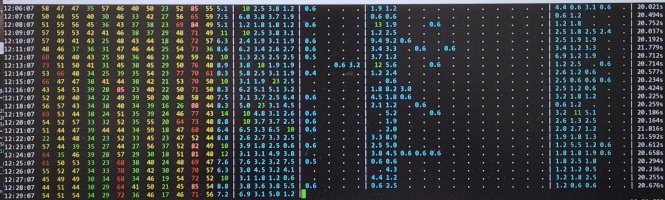
A view of 13 channels in 2.4 GHz, the first four non-DFS 5 GHz channels, the two DFS bands and then the high non-DFS channels. The numbers are utilization in percent. Dot means 0%.
Channel 11 is perpetually utilized. Is it non-WiFi interference? I can't tell because MT7612 has only two out of four metrics: active time and busy time. It does not have receive time and noise.
The sample output from Gemini has them, even when I asked for MT7612 explicitly. Upon further probing, it says it is for MT7615 — an AP-class chip. This is a good example where AI just mashes answers from similar sources to form a 'fuller' answer. It is amazing when it works, but it can fail spectacularly for specs.
Busy time is the bare minimum. It tells you how often the channel is busy. Receive time tells you how much of busy time is valid tranmission, i.e. not due to interference.
One thing that surprises me is that interference from neighbouring channels in 2.4 GHz band do not show up. If channel 6 is busy, I had expected +/- 2 channels to be busy as well. They aren't.
I see two patterns. One, a channel is busy and adjacent channels are clear. Two, immediate adjacent channels of a busy channel are also somewhat busy.
(I can see why routers choose 'random' channels now.)
Gemini says WiFi chips typically use -82 dBm for co-channel interference (Signal Detection threshold), but -62 dBm for noise (Energy Detection threshold). In other words, the +/- 2 channels are weaker than -62 dBm.
I'm not sure this explains what I see.
It takes 40s to scan all 38 channels, even though dwell time is just 100 ms per channel. This is already using 'optimized' scanning, where I take snapshot of several channels at once instead of one-by-one, i.e.
sudo iw dev "$DEV" survey dump >"$tmpf"

for chn in $ar; do
  sudo iw dev "$DEV" set channel "$chn"
  sleep "$DWELL_S"
done

sudo iw dev "$DEV" survey dump >"$tmpf2"
I ran into an unexplained case (bug?) where channel 1 stats were reset when I switched to another channel, so I had to scan it separately.
Much of the overhead is from scripting. On a faster machine, a cycle takes 18s. I increase the dwell time to 300 ms and it takes 26s.
Philips CX3550 first impressions
First impression is that the fan head looks smaller than the KDK M40KS. Indeed, the blade measures 35 cm, not 40 cm. I looked it up. Philips use 'head size' as opposed to 'blade size'. Deceptive marketing. Reminds me of CRT monitor sizes.
It is not as silent as it claims. Speed 1 is rather loud due to vibration. The fan is quiet, but the motor housing vibrates rather loudly — resonance? Ironically, speed 2 sounds softer. The motor vibration is gone and it is all fan noise. Sleep mode is exactly the same as speed 1. No change in speed nor noise.
Speed 1 is almost useless. It produces too little wind. You normally place a stand fan in a corner of a room to blow across the room. Speed 2 is good.
Power usage: speed 1 (30W), speed 2 (40W), speed 3 (48W). It uses DC motor supposedly, but it does not seem to be super efficient.
The app control is super laggy. A command takes several seconds to take effect. I didn't feel it previously cos I only controlled air purifiers, and I seldom change the settings.