HCI Open House 26
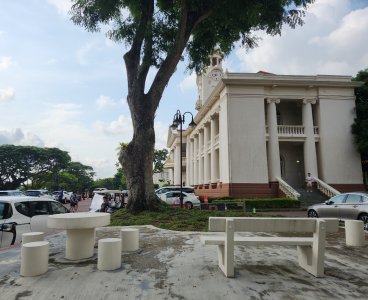
I'm just going back for nostalgia. A lot has changed, but when I walked through the parts that have not, it really brought me back.
Unfortunately, they did not open the library for public access this year. Otherwise, I would have a second wave of nostalgia — checking out the computer books.
Every time I see the library (even though it is not the same one in my youth), it reminds me of programming in 16-bit DOS. It was easy to write 'toy' programs, but there was an insurmountable gap to 'professional' programs — programs that manipulate large data (> 64 kB) and run fast.
I always thought, what if I knew then what I know now?
I squandered so much time trying to create building blocks. I tried to write a C compiler, implement the C Run-time Library in assembly language, write graphics functions, create a 'perfect' x86 asm language, etc. I never succeeded. If only I had proper guidance.
Time machine, anyone? :lol:
Superwide low-power binos
I'm looking for a wide-angle low-power bino and I found not one, but two!
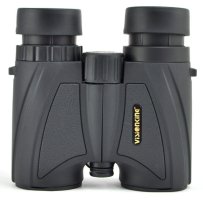
VisionKing (视界王) 5x25 bino
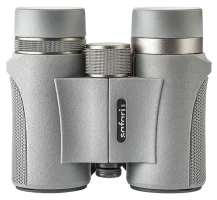
Safari Uni (观穹) 5x25 bino
||VisionKing|Safari Uni|
|---|+--|+--|
|Power|5x25|5x25|
|Prism|BAK4|BAK4|
|Prism coating|–|?|
|Coating|MC|FMC|
|L FoV @ 1000 yards|831 ft|786 ft||
|Angular FoV|15.8°|15°|
|Min focus|3 m|1.9 m|
|Eye relief|15 mm|14 mm|
|Eyepiece lens|23 mm|23.5 mm|
|Weight|590 g|556 g|
|Weight (measured)|?|?|
|Size (L x W x H)|125 x 116 x ? mm|130 x 113 x 50 mm|
15° FoV, wow! Eye relief is on the short side.
Both binos are big and heavy for 5x, but that is the tradeoff for wide FoV. If the sizes are correct, they are bigger than most of my 8x32 binos!
VisionKing 5x25
This is available since 2015. It is well known for its ultra-wide view and low price. Some feedback:
- Actual power is 4.7x24
- Actual FoV is 14.7°
- Prism aperture is 21.5 mm (*)
- Prism is uncoated
- Only middle zone (~8°) is sharp, outer zone is blurry
- Low contrast
- Not as bright
(*) This is undersized for its wide FOV.
It is not clear if the bino has FMC. Marketing says FMC, box says FC, bino says MC. Anyway, it is clear the prism is uncoated.
Has 38 mm flat objective glass, likely to seal the bino to make it waterproof — it focuses by moving entire optical train instead of just an internal lens element. Actual objective lens is 25 mm. There are some other rebands that market this as a 5x40 bino. It is not!
Safari Uni 5x25
I was unable to find much info on this bino. It has supposedly the same design as VK, perhaps with better coatings and build quality. It seems to have more accurate specs — closer to what users reported. The bino claims FMC, so prism is likely coated.
Digital pianos with light-up keys
I found not one, but two, digital pianos with light-up keys. These pianos do it right, just like Terence C2. The whole key lights up, not just a single spot. However, it applies to white keys only. Black keys don't light up nicely.

Carod ITAR (卡罗德一它) C2
957 yuan (S$178.75) with lifetime app membership. No full specs. Weight is not given. Key weight is 30g (very light) and the speakers are 10W.
The cheapest I've seen this gone for is 927 yuan.
Carod also has two more lighted pianos: A3 and A3 Pro. However, these are much more expensive (1,800 and 2,100 yuan).
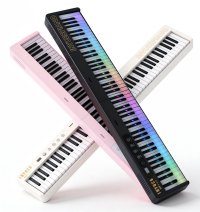
Inyues (音悦师) S300
Only 700 yuan (S$130.73), also with lifetime app membership. It is not the same model as above. Speaker power is not stated, but music source and weight are: Dream 5.0 and 5.2 kg.
The price jumps about alot, depending whether voucher is present. The cheapest I've seen this gone for is 593 yuan (S$111.16)! Sometimes 700, sometimes 740, sometimes 900 or 940 yuan. It has free shipping to Singapore too, so it is effectively half the price of the other piano. Very attractive!
I believe the hardware is made by the same OEM, but customized by two different brands (their dimensions are identical: 127 x 21.2 x 6 cm). The question is, how come one is 250 yuan more expensive? Does it have anything extra, or is it just the name? (I've not heard of it.)
A Night of Evening Drama (黄城夜韵) 2026

Overall: not as good as last year.
Show 1
Titled Paradise Island, based on a true event that happened in Pulau Senang Penal Settlement in 1963. I have not heard of it, but it is infamous enough that I can find it on Google easily.
It was an experimental, open-concept 'prison without bars'. Prisoners were allowed to roam freely and were put to manual labour, as part of a rehabilitation programme to allow them to rejoin society.
The Chief officer was 'benevolent', but strict — overly strict and harsh. He was friendly with a prisoner, who led the uprising, ironically. There were discontent over excessive workload and harsh discipline. He was really burnt to death. The rioters who committed murder were later hanged.
The play was a straightforward telling, it matched the real events pretty well.
Official records will never justify why the prisoners riot. In the show, the Chief was shown to be dictatorial. He had good intentions, but he never considered the prisoners' wellbeing — they were beneath him. That's a possible interpretation.
Show 2
It started with a boy who was stressed by his studies. He found solace and calling in a Teochew Opera Troupe.
His mother was very displeased, because she felt it had no future.
The Troupe was also struggling due to lack of interest. They had to innovate, but the Troupe leader was against it, wanting to keep to tradition.
In the end, the mother relucted, and the Troupe innovated and brought in modern dance-style moves. It was a really good excuse to give the audience a taste of Chinese opera. :lol:
There are two themes here.
The first is pretty relevant to the target audience (students): parents opposing the interest they want to pursue. From the student's PoV, the parents are being unreasonable. But parents are thinking from financial and social status PoV. In the past, parents would have forced their children to give up their interest for a stable choice in life. But now with GenZ, parents are resigned to supporting their children even after they have grown up. :lol:
The second is the need for traditional arts — or anything, really — to innovate to survive. Sadly, I don't think it is as easy — nor successful — as portrayed in the show.
I recognized three returning actors/actress in this play. I guess I won't be seeing them next year.
Show 3
The show must succeed, except it didn't — even after the Director time-travelled numerous times to help his younger self. Anything that could go wrong went wrong.
This time, he had the idea to recruit his ex-Drama mates.
With age came experience. They were able to help their younger selves, who were overwhelmed with the workload and overlooked crucial details.
It was revealed the Director's ex-Drama mates cared about him, but he was too fixated with the show's success to notice. When the show failed, he was obsessed with making it right, to the extent of inventing a time machine! Meanwhile, his friends had moved on with their lives.
It was also revealed one of the ex-Drama mate married him, though they had separated cos the Director spent all his time on his time machine.
The Director had some heated confrontations with his friends. His wife asked him why was he so obsessed with the show. Was it really the success of the show or was it something else that he really wanted to get back?
Finally, he finally realized the error of his ways. He had always been a one-man perfectionist, not willing to trust others to do things properly. That was why he had been nagging at them. He finally decided to trust others to do their job.
He reconciled with them one by one, both his present and future self. He also reconciled with his wife. When he hugged her, the audience went wild. I love teenage enthusiasm. :lol:
Finally, it was show time. The Drama members from the future watched from the backstage. Everything went well. No mishaps. Until a 'force of nature' (on a stage?) broke the prop — a ship — into three parts and the show seemed destined to fail after all.
The Drama members from the future leapt into action to push the ends of the ship back into one piece, and they managed to do it through the power of friendship.
The show ended successfully. This was the ending of the 'show' and Show 3.
It was not shown, but presumably, the Director could finally move on from this show and mend his friendships with his ex-Drama mates. This was done to end the show on a high note. But realistically, the past should remain unchanged. What changed was the Director was able to move on despite his failure and realizing there were more important things than his play.
Final thoughts
I don't like this year's shows as much because shows 2 and 3 are about plays. I prefer not to have 'play-in-play' settings. I understand this is most relatable to the cast as they are experiencing it live, and they have limited life experience.
There were some tear-jerking moments last year. There were none this year.
I notice some common threads for the three shows based on last and this year's show, though two years are too short to call a trend.
The first show is grounded in reality. Last year's show was on scam (a current event that can hit too close to home), this year's show is a historical event.
The second show is about the struggles of a teenager and escapism into his imaginative and colorful world. Last year, the show had varied fictional settings and a musical. This year, it is Chinese opera and its colorful props. You can say it is Chinese musical. :-D
The third show is about friendship... friendship that formed when young but have drifted apart due to some reason. They need to resolve it and resume their friendship. Last year's show was better because it invoked nostalgia. :-P
Mix in elements obsoleted by time, the constant need for innovation, and parents' unending worry about their children's future, and you have the basic formula.
Seating position
I sat in a Circle seat this year. It was about the same distance as last year, except higher up.
I brought along an 8x bino. I only used it to check occassionally — it gave a single-person closeup. A 6x would work better with wider view.
Really need to sit at least midway to the stage. Circle seat is fine, but must be in front.
Dyson AM07 tower fan speed vs power
Power consumption is listed as 56 W, sound level from 28 dB to 61 dB. Air flow is rated at 500 L/s at max speed, which according to Google, is equivalent to 1060 CFM.
|Speed|Power|dbA|
|---|---|---|
|0|0 W|44.5|
|1|4.7 W|45.6|
|2|6.3 W|48.0|
|3|9.2 W|50.2|
|4|12.4 W|52.8|
|5|17.5 W|55.8|
|6|22.0 W|57.5|
|7|27.3 W|59.5|
|8|33.8 W|61.5|
|9|41.4 W|63.2|
|10|50.4 W|65.0|
Sound is measured about 50 cm away by the side, not in direct air flow. The sound is still acceptable up to Speed 4. Speed 5 onwards start to sound noisy.
Speed 9 and 10 are "turbo" modes. The power jumps by so much suddenly.
Speed 0 = off. It measures background noise.
Imperfect temperature/humidity monitors
I got the round temperature/humidity monitor. It has humidity to 1 dec place – hurray! — but it is still imperfect. 😤
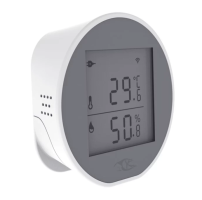
TY400H
Let's go through them one by one.
||KAAC0005-001|RSH-TH03|XJM0472|TY400H|
|---|+---|+---|+---|+---|
|Size|51x51x16.5 mm|64x64x28 mm|60x63x25 mm|74x75x28 mm|
|Weight|43.5g w/ batteries|71.5g w/o batteries, 140g w/|65.4 g w/o, 98.4 g w/|90.0 g w/|
|Power|2 AAA batteries|3 AA batteries|3 AAA batteries|2 AAA batteries|
|Temp precision|0.1°C|0.1°C|0.1°C|0.1°C|
|Temp accuracy|± 0.5°C|± 0.5°C|± 0.5°C|± 0.3°C|
|Humidity precision|1%|0.1%|1%|0.1%|
|Humidity accuracy|± 5%|± 5%|± 5%|± 2%|
(Accuracy for TY400H is suspect.)
Note: all can toggle between °C and °F.
KAAC0005-001
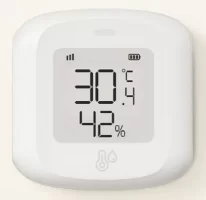
KAAC0005-001
Features:
- Sync mode: low (~8h), normal (~45 mins), frequent (~12 mins)
- Sampling period: 1, 3, 5, 10, 15 mins
- Temperature threshold: 0.3°C, 0.5°C, 1°C
- Humidity threshold: 3% RH, 6% RH
- Has high temperature alarm, but threshold cannot be set
- Has low battery alarm
- Shows temperature, humidity and battery life on Smart Life dashboard
The way it works is very intuitive. It will sample every X mins, if the reading exceeds the threshold, it will report. It will also report at every sync interval, whether reading has changed or not — this is useful as a heart beat.
Battery can last 3+ weeks in frequent mode, 3+ months in low power mode. (Both at 3 min sampling period.)
It is small and light. It can be stuck on a wall without fear of falling off.
The only real flaw is that when the device is power-cycled, it reverts to low power mode, 1°C and 6% RH threshold (not sure about sampling period). You need to set it back to the mode you want.
If the router power-cycles, the device won't be able to connect to it until it is power cycled — it caches the connection credentials. I don't know if other battery-powered devices have the same issue.
RSH-TH03
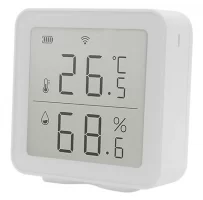
RSH-TH03
- Humidity to 1 dec place
- No sync mode
- Fixed threshold
- Has low battery alarm
No sync mode is not ideal, but still acceptable, except it has fixed threshold and they are too high: 1°C and 5% RH. Sampling period is unknown. (My guess: ~5 mins.)
Its reporting code is buggy. It sometimes skip reporting for hours, even though the readings have changed.
It uses 3 AA batteries, so it is big and heavy. Battery life is estimated to be < 2 months.
XJM0472
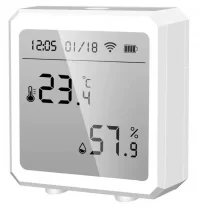
XJM0472
This would be perfect if it supports humidity to 1 dec place.
- Temperature reporting interval: 1 to 120 mins in 1 min step
- Humidity reporting interval: 1 to 120 mins in 1 min step
- Temperature sensitivity: 0.3°C to 2.0°C in 0.1°C step
- Humidity sensitivity: 3% RH to 20% RH in 1% step
- Has settable high and low temperature/humidity alarm
- Has low battery alarm
- Shows temperature and humidity on Smart Life dashboard
Shows date/time, but it is only updated when it synchronizes with Tuya Cloud. Set reporting interval to 60 mins? The time will be way off.
Battery is reported as states (e.g. high) instead of percentage.
Is reporting interval same as sampling period? Does it skip reporting if the reading is below threshold?
Test: after setting reporting interval to 60 mins, it still reports every ~5 mins if the readings exceed threshold.
TY400H
TY400H
- Humidity to 1 dec place
- Sampling period: 10 to 480 mins in 1 min step (in battery mode)
- Has temperature calibration: -2 to +2 °C in 0.1°C step
- Has humidity calibration: -10% to +10% RH in 1% step
- Has settable high and low temperature/humidity alarm
- Has low battery alarm
- Shows temperature, humidity and battery life on Smart Life dashboard
Can adjust reported temperature/humidity. This allows a fleet of devices to report consistent readings — all low-end monitors should have this, because there is usually some variance. Very nice feature.
No threshold, so I presume the device will always report at every sampling period?
Test: after setting reporting interval to 60 mins, it still reports every ~5 mins if the readings exceed threshold. (Threshold is unknown, though.)
Battery life is estimated to be < 2 months.
S22 vs S26
I used S6 for 7 years before replacing it. It was stuck at Android 7.0 and more and more apps required min of Android 9 for security purposes. It was failing as well. I later repaired it, but it turned out I never used it again — and it died earlier this year.
My S22 will be 5 years old next year. I'll probably change then. Let's look at S26 spec first.
||S22|S25|S26|
|---|+---|+---|+---|
|Size|146.0 x 70.6 x 7.6mm|146.9 x 70.5 x 7.2 mm|149.6 x 71.7 x 7.2 mm|
|Weight|168g|162g|167g|
|Display|6.1"|6.2"|6.3"|
|Resolution|2340x1080, 422 PPI|2340x1080, 416 PPI|2340x1080, 411 PPI|
|Aspect ratio|19.5:9|19.5:9|19.5:9|
|Screen-to-body|88.6%|91.1%|90.0%|
|Camera|50 MP FL 23mm f/1.8<br>10 MP FL 70mm f/2.4<br>12 MP FL 13mm f/2.2|50 MP 24mm f/1.8<br>10 MP 67mm f/2.4<br>12 MP 13mm f/2.2|50 MP 24mm f/1.8<br>10 MP 67mm f/2.4<br>12 MP 13mm f/2.2|
|Camera AR|4:3|4:3|4:3|
|Selfie Cam|10 MP 26mm f/2.2|12 MP 26mm f/2.2|12 MP 23mm f/2.2|
|WiFi|802.11ax dual|802.11be tri|802.11be tri|
|Memory|8 GB|12 GB|12 GB|
|Storage|128, 256 GB|128, 256, 512 GB|128, 256, 512 GB|
|Battery|3700 mAh|4000 mAh|4300 mAh|
|USB|Type-C|Type-C, DP 1.2|Type-C, DP 1.2|
S26 is starting to get too big for me.
I suspect S27 base model may go back to 64 GB due to high memory prices.
Another disappointing temperature monitor
Unlike what is advertised, humidity has no decimal place. Argh, it is the whole reason I buy this!

||KAAC0005-001|RSH-TH03|XJM0472|
|---|+---|+---|+---|
|Size|51x51x16.5 mm|64x64x28 mm|60x63x25 mm|
|Weight|43.5g w/ batteries|71.5g w/o batteries, 140g w/|65.4 g w/o, 98.4 g w/|
|Power|2 AAA batteries|3 AA batteries|3 AAA batteries|
|Temp precision|0.1°C|0.1°C|0.1°C|
|Temp accuracy|± 0.5°C|± 0.5°C|± 0.5°C|
|Humidity precision|1%|0.1%|1%|
|Humidity accuracy|± 5%|± 5%|± 5%|
At least it is lighter.
Other than the disappointment over humidity, it is fine otherwise. Threshold can be as low as 0.3°C, 3% RH. Periodic update as short as 1 min, though I think 15 mins is good enough — remember, it will update if it exceeds the threshold.
I wonder if there is really a variant with humidity to 1 dec place. I suspect not.

Three different monitors, three different readings. (They have not acclimatized in this shot, so it is normal they show different readings.)
Temperature is pretty spot on. Humidity has a little variance.
Lesson not learnt
I found yet another temperature/humidity monitor with 1 dec place. I saw this previously, but gave it a pass cos it is rather big. I'm quite sure it has 1 dec place — there are real photos of it.
Interestingly, it supports both battery and USB power.
This will be the last one I get... not going to buy anymore.
Power Grid game power plant upgrade at last!
I have waited an eternity for this. I have bought Power Grid resource upgrade parts in the past, but I could never find a good set of power plants.
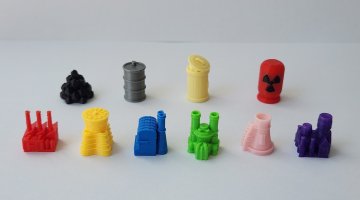
Got the whole set for 66 yuan (S$12.36). The plants have their own 3D printed containers.
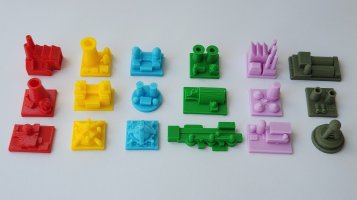
This seller has 18 power plant designs in all. Very creative! They look even better painted, but you need to DIY. I got this set for 45 yuan (S$8.43). He has resources as well, but they don't look as nice.
Fan over air filter directly, life hack?
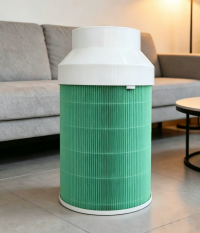
Someone found a life hack. Instead of an overpriced air purifier, simply buy the air filter (which is also costly) and put a fan over it. After all, isn't that what an air purifier really is?
This is a good idea, except it is not as good as you think.
First, it moves much less air. The reason is simple: the fan is smaller. An air purifier has a bigger fan. That's why it is so big. Half of it is the air filter. The other half is the fan.
Second, the fan speed is usually fixed, so you are stuck with one level all the time. If you intend to run it 24/7, I'll suggest using a low-powered fan so that it is silent. Higher-end models are variable speed.
Third, it needs to be air-tight between the fan and the air filter, else the air will just enter through the gaps, i.e. the path of least resistance.
In summary:
- It works
- It is not as good as an air purifier using the same filter
- Air purifiers are way overpriced
An example: the Philips AC3033 air purifier costs around S$550 new. It is very expensive for what is really a fan and a filter. Its filter costs S$125 (at full price), though it is rated for 3 years lifespan, so $42 per year.
Does air-con lower humidity?
It is common belief that air-con lowers humidity. It is true, but only during the cooling phase. When the set temperature is reached and the air-con is in maintaining mode, humidity rises.
The graph below shows the humidity level over time. The top line is humidity, the bottom line is temperature.
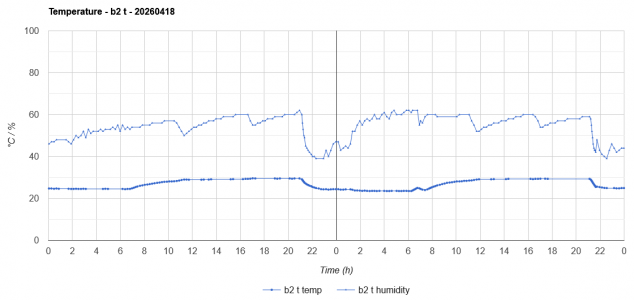
|Time|Temp|Humidity|
|---|+--|+--|
|21:00|Air-con is turned on|Humidity drops from 60% to 40%|
|23:00|Near set temperature|Humidity fluctuates as compressor is turned on less|
|01:00|At set temperature|Humidity rises as compressor is turned on much less|
Can see a dip in humidity level at 11:00 and 17:00 when the dehumidifier is turned on.
Disappointed with new temperature monitor
I have bad first impressions of the new temperature/humidity monitor that I just bought.
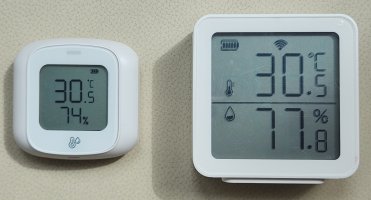
It is big and heavy! It is already heavier w/o batteries. I wonder if I can tape it on the wall safely.
The box of one unit is noticeably older and dirtier, not to mention crushed. The WiFi also does not work. While the monitor works, it is useless to me as I want remote monitoring (遥测). Let's see if the seller is willing to compensate.
(Update: no.)
||KAAC0005-001|RSH-TH03|
|---|+---|+---|
|Size|51x51x16.5 mm|64x64x28 mm|
|Weight|43.5g w/ batteries|71.5g w/o batteries, 140g w/|
|Power|2 AAA batteries|3 AA batteries|
|Temp precision|0.1°C|0.1°C|
|Temp accuracy|± 0.5°C|± 0.5°C|
|Humidity precision|1%|0.1%|
|Humidity accuracy|± 5%|± 5%|
It has very few settings in Tuya Smart Life app. There is no settings for threshold and update frequency. Based on preliminary data, the fastest it updates is once every 18 mins.
Also, its updates to Tuya Cloud is buggy. It sends 5 - 6 sets of identical data at 0.5s interval.
Based on info in a listing, it updates to Tuya Cloud only when the temperature changes by 1°C or humidity by 5%. It does not support periodic update. Why do I only find this out now? If I had known, I would not have bought it.
There is a very similar model. I skipped it because the numbers are smaller. It is about the same size, but it should be lighter because it uses 3 AAA batteries.
XJM0472
The refresh rate can be adjusted from 1 to 120 mins.
Moral of the story: need to pay attention to details.
There seems to be two variants of this model. One has humidity to 1 decimal place, the other to whole number.
Let's hope it actually supports 1 dec place.
Temperature monitor, take 2
I bought three battery-powered temperature/humidity monitors last year. The main reason was to put them in places where it was difficult to run a USB cable for power.
Temperature is precise to 1 decimal place, humidity to whole number. Accuracy is +/- 0.5°C and +/- 3% RH.
This monitor measures temperature/humidity quite often (in minutes), but it updates to Tuya Cloud once every few hours!
There is a bug in how this device determines the update rate/threshold. It queries Tuya Cloud on power-up. Somehow Tuya Cloud returns 'no change', so it uses its defaults — which is super insensitive (low power mode, 1°C, 6% RH). To make it use the correct settings, we need to change the settings twice.
First, change the settings in Tuya app. It will say settings will be applied on next update. Power cycle the device and let it take the settings. Then change the settings in Tuya app to the ones you want. Power cycle the device again. This is tedious, but is still not too bad if we only need to do it once every few weeks — when the battery runs out, except...
It sometimes hangs or loses network connection. It is not obvious due to its low update frequency. Also, if the router reboots, it will not connect until it is rebooted. It's like it caches the previous authentication keys and only authenticates on power-up.
I was able to determine the sync rate with some experimentation:
|Sync|Time|
|---|---|
|Low power|~8 hours|
|Normal|~49 mins|
|Frequent|~12 mins|
Normal sync rate is acceptable, but it defaults to low power mode.
RSH-TH03
I found another model this year. It is slightly bigger at 6.4 x 6.4 x 2.8 cm. It uses 3 AA batteries. Both temperature and humidity are precise to 1 decimal place. Accuracy is +/- 0.3°C and +/- 3% RH.
Let's hope it works better.
Fury of Dracula 5th Ed
Leaked prematurely, but finally an official announcement.

There are some rules changes every time, the intention is to simplify and streamline the game, but also to adjust the delicate balance between the vampire and the hunters. Unlike other hidden movement cat-n-mouse games, FoD is not purely a chase. Both sides have special powers. The vampire can fight back — though it is more advantageous to delay being caught or be caught on home ground.
I won't be getting this. 3rd ed is good enough for me. I wished I had kept the 2nd ed box, though.
I have many hidden movement games :sweat::
- Clue: The Great Museum Caper (1991)
- Fluch der Mumie (Curse of the Mummy) (2008)
- Fury of Dracula, 3rd ed (2015)
- Ghost Chase (2001)
- Nuns on the Run (2012)
- Scotland Yard (1983)
FoD is the most complex of the lot.
Nuns on the Run, v2
I'm surprised this game is reprinted. Didn't expect it to be popular enough.

The board is a lot more colorful and the cards more cartoony. There are two rule changes:
- No more line-of-sight. A nun can see the entire room (smaller rooms now)
- +1 to a nun's detection range if you run
The original board is very dark, but it fits the theme. It is supposed to be dark because it is dead of night!
Determining LoS is more tedious, but it leads to higher tension. You can be in the same room but remain out-of-sight. It makes sense because it is dark. Generally only the chapel and garden are big enough for this.
End of Acquire '93 holy grail quest
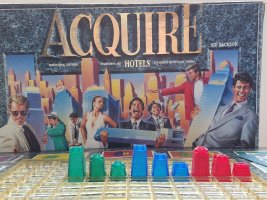
I managed to sell this after I brought the price down... significantly. Unlike the AH 98 version, I did't feel so heart-pain. It was a mistake to buy this in the first place.
This edition is meant for Acquire game collectors.
Spacemate in Tuya app
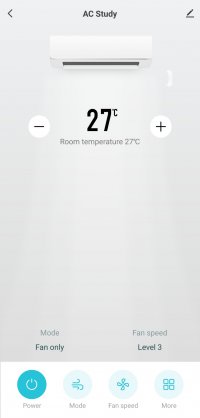
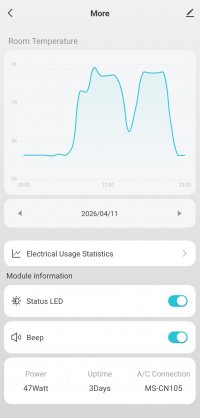
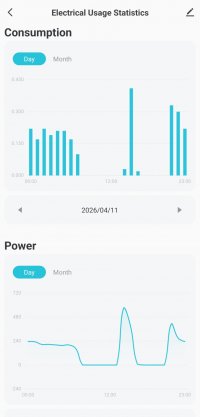
Not bad, has electrical usage statistics too.
The product name is WiFiKIT-II-MRSLIM in Tuya IoT platform. Its version is 3.1.69.
add_ele and cur_power fields are not part of Standard Status Set, so they cannot be queried using Get Operation Log API — until you change the device from Standard Instruction mode to DP Instruction mode. These two fields are sent every 5 mins when in use. Other fields are sent on change only.
Now I'm finally able to achieve fan mode for 20 mins using Tap-and-Run scene.
Installing Spacemate WiFi module
I decided to buy the Spacemate WiFi module after all.
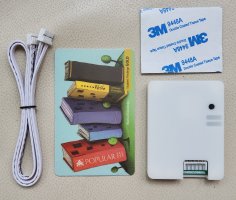
It is pretty small and light.
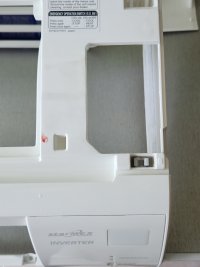
I cut myself when I removed the air-con FCU front case. It is always difficult if you have never done it before.
Starmex MSXY-FP is easy once you know the correct steps:
- Remove the two screws at the front bottom
- Unclip the clip at the bottom center
- The front cover can then be tilted up
- Once the cover is tilted, the four clips at the top can be released easily one by one
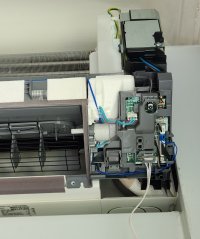
The CN105 port is not on the mainboard on MSXY-FP. It is at the IR receiver. I didn't know that and opened the mainboard cover unnecessarily. Short panic when I could not find the connector.
(This was mentioned in the Spacemate WiFi module installation video, but I didn't know what it meant at that time.)
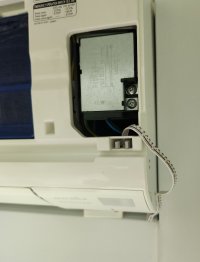
I decided to run the cable out of the case. It should be possible to tape the module to the metal part and keep it hidden by the front cover.
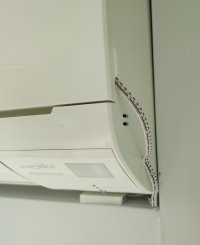
The front cover can still be closed fully.
Air-con WiFi module by Spacemate
I find it tedious to set my Starmex air-con to fan mode for 20 mins after use. It's not that bad if I turn it off at a consistent time, but at any other time, I need to change the Off time, and this takes time — need to hold the left/right keys and watch the time inc/dec by 10 mins every 0.5s. If only the air-con has auto-fan mode, or a smarter Remote Control, or... WiFi.
Starmex does have WiFi, but it is rare and expensive ($200+ per FCU). Will need to use its app too.
A common workaround is to use a WiFi IR RC, but I want something that connects to the FCU directly.
I googled from time to time and this time, I found a third-party option!
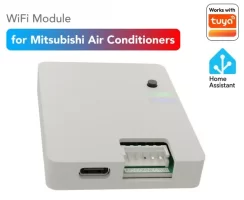
There are two models: for Mitsubishi Electric and Daikin air-cons. Each model has two variants, one local Home Assistant only ($79), the other Tuya ($99).
And it is made by a local Singaporean! (No wonder he targets these two air-con models; they are the most popular models locally.)
It costs $109 on Lazada. It must be due to 'Lazada tax'...
$100 for each FCU is quite ex, though.
Repairing the PV28-CW PM monitor
I was able to undertake this repair only very recently, after I acquired three pieces of information.
This Air Monitor is called PV28-CW. Once I knew its name, I was able to gather very limited information about it. Apparently people had been flashing their own firmware to it (with limited success)!
The first thing is how to take it apart. Apparently it is a common technique to hide screws behind the display cover.
Second is that a common failure for PM sensor is that its fan gets dislodged.
Third is that a dislodged fan can be put back! (If you can get to it.)
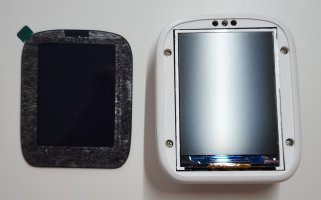
Peeled off the display cover
First step was to peel off the display cover. It turned out to be pretty simple.
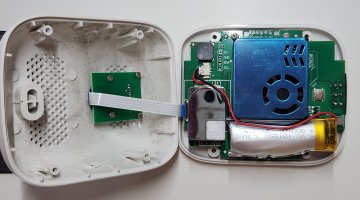
Opened up
I decided not to disconnect the flex cable since it was not needed to do so. No need to stress it.
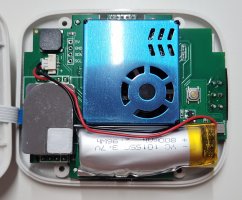
A closer look
Can see the CO2 sensor, PM sensor and battery. The battery is 3.7V 800 mAh. It seems a bit bloated. Now that I can open up the unit, maybe I can find a replacement for it. I checked the fan was indeed dislodged by poking it with a micro screwdriver through the air vents.
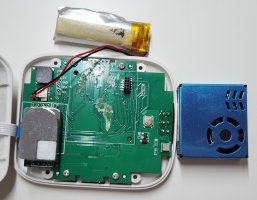
Removed the PM sensor and battery
I tried to open the PM sensor directly, but found it impossible. I needed to remove the battery before I could peel the PM sensor off — both were taped to the PCB board. I checked that the PM sensor was not soldered on first. The CO2 sensor seemed to be soldered on.
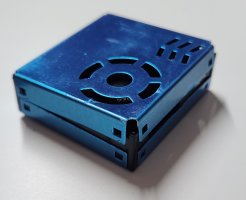
Opening the PM sensor
Needed to pry open the top on all four sides. It was not difficult, just need a micro flathead screwdriver.
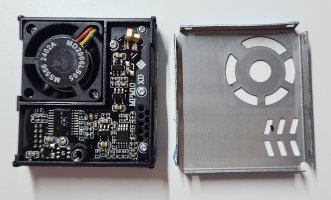
PM sensor opened!
Opened! Next was to unscrew the fan. I had to use my smallest micro screwdriver.
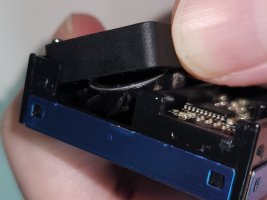
Fan is dislodged
I could only lift the fan up a bit. Luckily it was enough to fiddle with the fan blade.
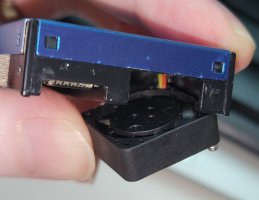
Managed to push it in after some tries. It must have dislodged when I dropped the device from the bookshelf.
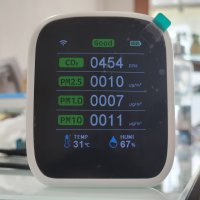
Reassembled
In working condition once again! (Battery is still flat.)
Replacing other parts
Will I be able to replace the battery and CO2 sensor?
I was not able to find a 1-to-1 replacement battery. It must exist, just need to search more. Higher capacity would be nice (*), but it won't fit in the space — around 5 cm.
(*) 800 mAh lasts around 4.5 hours, needs 4000 mAh (mobile phone battery capacity) to last a full day. It needs to be much more power efficient, a bigger battery won't help — I want battery life in terms of months.
I also could not find an identical CO2 sensor. There are very similar ones, but I don't know if they are drop-in replacement. Good news: a CO2 sensor costs around 40 - 50 yuan (~S$7.50).
The CO2 sensor is soldered on the PCB, it will take more effort to replace it.
At this point, the best scenario is to hope the CO2 sensor is merely blocked/dusty and a cleaning will unblock it. This is possible because a NDIR sensor is supposed to last for 5 to 15 years. I don't see any opening, though.
Interrupt with current events
Trump bet on an internal regime change. He lost the bet. No doubt part of it was bad intelligence and over-optimism on the instablity of the Iran regime.
The Iran regime understood information was power. In Jan, when there were widespread protests, they cut off all Internet access. Even the supposedly decentralized Starlink failed to work — due to GPS spoofing and radio jamming. They were really prepared.
Many people are unhappy with Trump because he started the war and Iran not only retaliated against USA and the Gulf countries, but it also managed to hold the entire world hostage.
Trump stepped on the hornets' nest, but the hornets' nest is always there.
This war needs to be fought sooner or later. Iran has a stranglehold on the Straits of Hormuz. They already fired missiles at oil tankers in the mid-80s. I did not forget.
While it disrupts world economy now, if Iran ever develops nuclear weapons — and they have always been doing it, despite what they claim — then it is over. No one can threaten them again. And this is why they will pursue it.
A high-precision modular sensor module
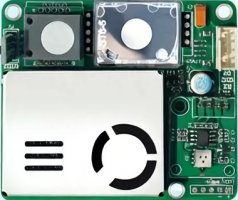
Modular sensor module
|Humidity|PM|CO2|VOC|HCHO|Cost (yuan)|
|---|---|---|---|---|---|
|Y|-|-|-|-|27.35|
|-|-|-|Y|-|29.31|
|Y|-|-|Y|-|39.11|
|-|-|-|-|Y|66.53|
|-|Y|-|-|-|76.33|
|Y|Y|-|-|-|85.24|
|Y|Y|-|Y|-|116.51|
|Y|Y|-|Y|Y|151.61|
|Y|Y|Y|Y|-|179.24|
|-|Y|Y|Y|Y|218.44|
|Y|Y|Y|Y|Y|247.84|
Temperature and humidity are precise to 0.1 units. Accuracy is +/- 0.5°C and +/- 3%.
The first 3 rows are taken from another seller.
Estimated component prices:
|Component|Cost (yuan)|
|---|---|
|Board|17.55|
|Humidity|9.80|
|VOC|11.76|
|HCHO|48.98|
|PM|58.78|
|CO2|96.23|
VOC is the most useless sensor in a consumer monitor. It does not distinguish between harmless and harmful compounds, and is misled by humidity and alcohol. It can be used relatively — if the reading goes high, you need to find out why.
HCHO is also known as Formaldehyde. It is a big deal in China due to off-gassing from new building and furniture. It is also not super accurate — it can give false positives.
Once again, we see CO2 sensor is expensive.
As you can see, a complete sensor module is already 250 yuan (S$46.77). I don't expect a complete monitor (with display, WiFi and battery) to be less than 750 yuan (S$140.13).
A new Air Monitor
I had a chance to buy it at 204 yuan (S$38), excluding shipping, but I decided to wait one day and it reverted to its usual price of 224 yuan (S$42). Shipping would add another $5 or so. I decided to get it from Lazada at S$49 instead.
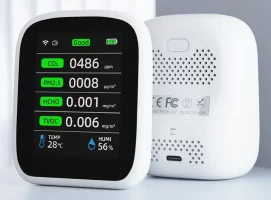
I wonder if I should get a new unit at all. My existing units still limp along fine. I only need to monitor CO2 level in two bedrooms. I realize I don't need to monitor PM2.5 in rooms with air purifier, because the air is 'clean' — the readings are 0 most of the time.
(The air is clean, but dust can still settle over time.)
Update: there is a v2 of this Air Quality Monitor. The WiFi version costs 390 yuan (S$73). The hardware seems to be identical, but it presents data in a different way. It has 3 screens in total. It seems to be available in Chinese only for now.
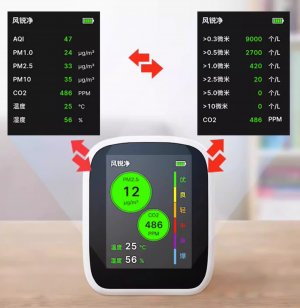
New model
What I find interesting is that it can measure particulate by count. This is supposed to be more meaningful indoors and at low concentrations.
The temperature and humidity accuracy remain unchanged at +/- 1°C and +/- 5%.
A row of air quality monitors
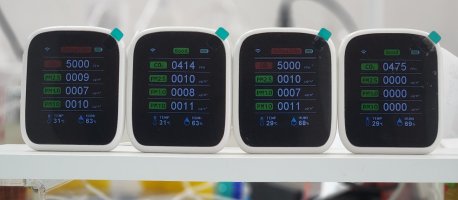
Msr, B2, B3, Study
It is only today that I know this is called PV28-CW. Apparently someone said it has a real CO2 sensor (NDIR) and a decent PM sensor. That's good to know. If only it is more reliable. :lol:
|Unit|Battery|CO2 Sensor|PM Sensor|
|---|---|---|---|
|Msr|N|N|Y|
|B2|N|Y|Y|
|B3|N|N|Y|
|Study|N|Y|N|
All the batteries have died. They shut off once disconnected from USB power.
What's new? The PM Sensor has spoilt on one unit. At first I thought they were all spoilt, but they show non-zero reading once moved out from their room — the rooms are clean due to air purifier running 24/7.
Only one unit is fully functional now, battery aside.
Taken from TaoBao, these are supposedly the sensors used:
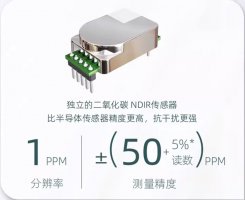
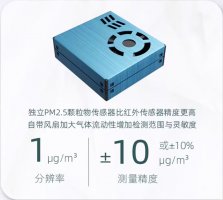
NDIR and PM sensors
The PM sensor has a tiny fan to circulate the air. The fan must have spoilt for the Study unit cos when I use a blower to blow air into the air openings, the PM readings go up, and they quickly return to zero once the blower is removed.
Garbage air quality monitor
I bought this Air Quality Monitor to replace my failing ones. tl;dr: it is garbage.
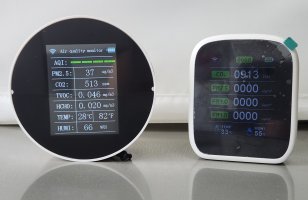
7-in-1 (left) and 8-in-1
It is bigger than I thought. The physical design is nice. The display is not as polished as the 8-in-1 AQ — the fonts and layout look amateurish — but is acceptable. It shows temperature in both Celsius and Fahrenheit at the same time. It has clock on a separate page — with alarm functionality— can show historical readings (by day) in a graph form and a settings page.
The display is always on. It cannot be turned off. The readings also update rather fast, every 1 - 2s.
After I connected it to Tuya Cloud and proceeded to download the data, it was already several pages long (each page has 100 entries) — even though it was on for less than 20 minutes! It is just as chatty as the 8-in-1 AQ, if not more.
Strangely, battery level is not reported.
Its Tuya detail page is also a little strange. The layout, the font used and the colorful backdrop make it look like an engineering student project with no graphical designer involved. There is no history nor settings. The PM 2.5 unit is also mislabeled as "mg/m^3".
I noticed the CO2 field is named "eco2", so I googled what it meant. Bad news, it means "equivalent CO2". CO2 level is extrapolated from TVOC reading. Human breath contains VOC, so VOC can be used as a proxy for CO2, and VOC sensor is cheap.
Upon cursory observation, both CO2 and TVOC readings go up and down together. They also flucuate a lot and the CO2 reading is wildly off compared to my 8-in-1 AQ. In the same enclosed room, the 8-in-1 AQ measured a steadily rising CO2 from 400+ to 1000+ PPM, but the 7-in-1 AQ still remained at 430+ PPM.
If I wasn't convinced that the 8-in-1 AQ measures CO2 before this, I now am! Its product page says:
From Google AI:
- NDIR Infrared Sensor (CO2): delivers high-precision, stable carbon dioxide detection by measuring infrared light absorption
- Laser Particle Sensor: detects particle concentrations (PM1.0, PM2.5, PM10) such as dust, smoke, and pollution by using a laser to scatter particles
- Semiconductor Sensor: identifies total volatile organic compounds (TVOCs) and formaldehyde (HCHO)
- Optical & Distance Sensors: often used to detect ambient light or measure proximity to objects
The last one is to support its auto-brightness and auto-on features.
Based on my current experience, if you want CO2 reading, you must get one with NDIR sensor (at least). Deriving CO2 from TVOC is bullshit.
The 7-in-1 AQ is likely to have three sensors only:
- Temperature/humidity (one unit)
- PM
- VOC
The PM sensor does not seem to be accurate too. It says the room has ~30 ug/m^3, but I have an air purifier running and it should be < 3 ug/m^3.
Only temperature and humidity readings are correct.
It costs $46.50 (before discount) compared to $60 for the 8-in-1 AQ.
8-in-1 AQ is expensive, but a real CO2 sensor (NDIR) is expensive. eCO2 is total garbage.
From Reddit posts, I found a real air quality monitor: Qingping (青萍) Pro 2. It costs S$200. :horror: You can tell it is good because it shows temperature and humidity to one decimal place. All the cheap ones give round numbers only due to lack of accuracy (temperature +/- 1°C, humidity +/- 5%).
Update: I found on TaoBao there are two variants of this monitor. One comes with VOC sensor (228 yuan; S$42.50), the other NDIR sensor (311 yuan; S$57.90). Note the difference in price. But now that I've used it, I won't get this even if it has NDIR sensor. I'll rather get the 8-in-1 AQ — it's more slick.