Level 1: you 'own' a car. The implicit assumption is that you can afford a monthly car installment of ~$2k. Owning a car in Singapore is a low-key status symbol.
'Own' is in quote because the bank owns it. There is no statistic on paid-off cars, but my guess is most people stretch their loan for as long as possible.
Level 2: $100k total annual income. This is not as high as you think. It is $7.7k/mth with AWS. Your take-home pay is $6.2k.
(Total income can be confusing. It usually excludes employer CPF contribution, but sometimes includes it.)
Level 3: $10k/month. Your take-home pay is $8.4k. This translates to $147k gross annual income. (CPF caps at $102k/year.)
Level 4: $1k income tax per month. Needs chargeable income of $147k, or $186k total annual income. This is around $12.8k/month.
Level 5: save $5k/month without others covering your expenses. This is $60k/year.
These are just rough gauges. You can 'own' a car with $4k pay by sacrificing everything else, for example.
Level 2 to 4 measure pure earning power.
Level 5 is your savings ability. If you can save 70% of your take-home pay, you can achieve it with a pay of $9k/month. But generally, it is comfortable to save up to 30%. 40% will already start to feel tight.
Is $60k a lot? It feels a lot if you are trying to save for it. But this is just enough for the downpayment of the cheapest new car if you follow the proper rules.
Originally, I scrapped The Regressed Mercenary's Machinations from Novelight and Novelbin (now Novelarrow). After it stopped updating, I looked for other websites. I found two more:
It turns out all four are translated independently. This is rare.
Faqwiki.xyz has the worst quality. It looks 100% machine translated (MTL) with no clean-up. The most tell-tale signs for Korean novels are inconsistent names and flipped gender. It is still readable, though.
Revenger Novels reads fine, but it charges more than Novelight.
Novelarrow stopped at chap 839. It is not known if it will continue. Many chapters are the same as Novelight.
Novelight's quality is decent, but is free up to chap 802. There are 100 chapters to go — each one is US$0.15.
I have to read up to this point to decide if it is worth continuing. I stopped at chap 728 — or slightly earlier, I don't remember. At that point, the story went in a direction I didn't like.
After seven months, I'm still unable to find a second source for Hiding a House in the Apocalypse. The last free chapter is 262.1, last chapter 293.8. Don't be misled, there are 80 chapters, not 32.
Each chapter needs 15 coins, or US$0.15. One chapter is cheap, but they add up quick. 80 chapters will cost US$12.
I hope this is an exception and not the norm, else it will get expensive really fast.
The story itself is B+, translation is also B- quality. But it is good enough. It is made up of many short arcs with many twist-n-turns. There is a wide recurring cast with varied personalities and quirks. You slowly learn more about them as the protagonist interacts with them.
Surviving The Game as a Barbarian is stalled at chapter 944 since June. The author is on hiatus — it is said he lost his cliffnotes! Last free chapter is 815.
There is another source, but it is progressing slowly and has slowed down in recent months. The translator may be losing interest.
The Regressed Mercenary's Machinations ended at chapter 902 in April. Last free chapter is 802.
There are two other sources. One was promising, but its last free chapter ended even earlier at 780. The other one has full chapters, but I have not checked its quality.
Finally, I got a MT7612 WiFi USB adapter and it worked as expected!
(Not without some panic. I first inserted it in a USB 3.0 port and it was not detected. I thought it was spoilt.)
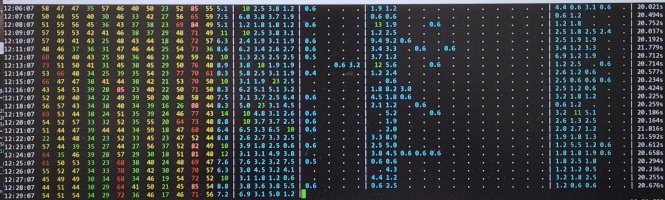
A view of 13 channels in 2.4 GHz, the first four non-DFS 5 GHz channels, the two DFS bands and then the high non-DFS channels. The numbers are utilization in percent. Dot means 0%.
Channel 11 is perpetually utilized. Is it non-WiFi interference? I can't tell because MT7612 has only two out of four metrics: active time and busy time. It does not have receive time and noise.
The sample output from Gemini has them, even when I asked for MT7612 explicitly. Upon further probing, it says it is for MT7615 — an AP-class chip. This is a good example where AI just mashes answers from similar sources to form a 'fuller' answer. It is amazing when it works, but it can fail spectacularly for specs.
Busy time is the bare minimum. It tells you how often the channel is busy. Receive time tells you how much of busy time is valid tranmission, i.e. not due to interference.
One thing that surprises me is that interference from neighbouring channels in 2.4 GHz band do not show up. If channel 6 is busy, I had expected +/- 2 channels to be busy as well. They aren't.
I see two patterns. One, a channel is busy and adjacent channels are clear. Two, immediate adjacent channels of a busy channel are also somewhat busy.
(I can see why routers choose 'random' channels now.)
Gemini says WiFi chips typically use -82 dBm for co-channel interference (Signal Detection threshold), but -62 dBm for noise (Energy Detection threshold). In other words, the +/- 2 channels are weaker than -62 dBm.
I'm not sure this explains what I see.
It takes 40s to scan all 38 channels, even though dwell time is just 100 ms per channel. This is already using 'optimized' scanning, where I take snapshot of several channels at once instead of one-by-one, i.e.
sudo iw dev "$DEV" survey dump >"$tmpf"

for chn in $ar; do
  sudo iw dev "$DEV" set channel "$chn"
  sleep "$DWELL_S"
done

sudo iw dev "$DEV" survey dump >"$tmpf2"
I ran into an unexplained case (bug?) where channel 1 stats were reset when I switched to another channel, so I had to scan it separately.
Much of the overhead is from scripting. On a faster machine, a cycle takes 18s. I increase the dwell time to 300 ms and it takes 26s.
First impression is that the fan head looks smaller than the KDK M40KS. Indeed, the blade measures 35 cm, not 40 cm. I looked it up. Philips use 'head size' as opposed to 'blade size'. Deceptive marketing. Reminds me of CRT monitor sizes.
It is not as silent as it claims. Speed 1 is rather loud due to vibration. The fan is quiet, but the motor housing vibrates rather loudly — resonance? Ironically, speed 2 sounds softer. The motor vibration is gone and it is all fan noise. Sleep mode is exactly the same as speed 1. No change in speed nor noise.
Speed 1 is almost useless. It produces too little wind. You normally place a stand fan in a corner of a room to blow across the room. Speed 2 is good.
Power usage: speed 1 (30W), speed 2 (40W), speed 3 (48W). It uses DC motor supposedly, but it does not seem to be super efficient.
The app control is super laggy. A command takes several seconds to take effect. I didn't feel it previously cos I only controlled air purifiers, and I seldom change the settings.
